Spark Tutorial (Part 4) - The Swiss Army Knife: UDF/UDTF

Introduction
UDF/UDTF
By this point in your exploration, you’ve probably noticed that the built-in tools already cover most day-to-day data transformation needs, whether you’re working with a Spark DataFrame or a pandas-API-on-Spark DataFrame. But what if you want to write your own function — one that takes some arguments, runs your custom logic, and hands back exactly the result you want, just like writing a regular program? Is that possible in Spark?
It is, and Spark provides a set of tools built exactly for this: UDF / UDTF. What they do, in short, is take your data row by row, run it through your function, and output the result as a DataFrame. The tradeoff is that they’re typically slower than Spark’s built-in native functions — but in exchange, you get the flexibility to shape the output exactly to your needs, which makes them genuinely useful.
So what’s the actual difference between UDF and UDTF? Let’s look at the comparison below.
UDF vs. UDTF: What’s the Difference
The core distinction between a UDF (User-Defined Function) and a UDTF (User-Defined Table Function) comes down to two things: the mapping relationship between input and output, and the structure of what’s returned:
- UDF is one-to-one: it takes in one row of data and returns a single scalar value.
- UDTF is one-to-many: it takes in one row of data and, via
yield, expands it into a full table with zero or more rows and multiple columns.
📊 UDF vs. UDTF Comparison Table
| Aspect | UDF (User-Defined Function) | UDTF (User-Defined Table Function) |
|---|---|---|
| Mapping | One-to-one (1 input row → 1 output value) | One-to-many (1 input row → multiple output rows/columns) |
| Return Type | A single type (e.g. StringType(), IntegerType()) |
A table structure (must define multiple field names and types, e.g. "key: string, value: string") |
| PySpark Structure | @udf decorator on a regular Python function |
@udtf decorator on a Python class containing eval() |
| Return Mechanism | Uses return to hand back the result |
Uses yield to emit multiple rows dynamically |
| Where It’s Called in SQL | In the SELECT column list or a WHERE clause |
In the FROM clause, typically paired with LATERAL |
| Typical Use Cases | • String cleanup/transforms (trimming, uppercasing) • Encryption/hashing • Custom arithmetic logic |
• Flattening nested JSON • Text tokenization • Exploding arrays/lists (similar to explode()) |
Let’s walk through a few real examples to see how UDF and UDTF are actually written.
UDF
The useArrow=True parameter cuts out a chunk of the time normally spent converting data formats between Python and the JVM. Without it, a UDF call goes through this sequence: the JVM converts the Java object into Pickle format, hands it to Python to unpack, and once Python finishes computing, it gets pickled back to the JVM.
With this parameter enabled, Apache Arrow uses a shared columnar format in memory that both Java and Python can read directly, which eliminates nearly all of that conversion overhead.
|
|
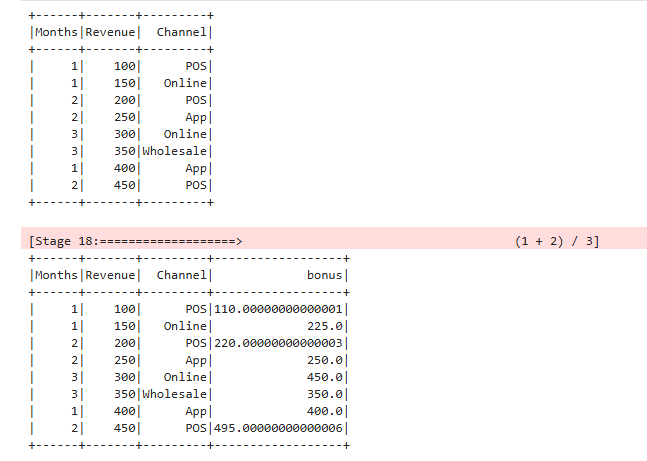
As you can see from the result, when defining the function you need to specify the return type up front. Once that’s done, you can call it directly inside a DataFrame operation using function_name(p1, p2) syntax.
Using a UDF in Spark SQL
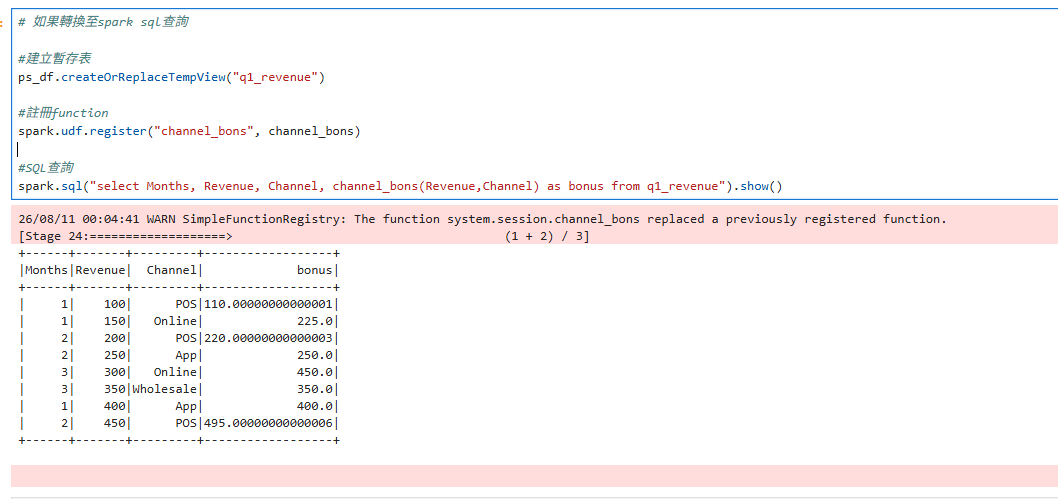
There are two things to keep in mind when calling a custom function from Spark SQL:
- Register the DataFrame as a temp view
- Register the function so SQL can call it
|
|
UDTF
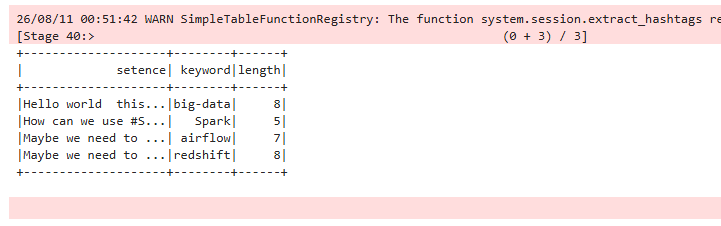
UDTF really shines in situations where you need to expand a nested structure into multiple rows. That’s a bit abstract in the abstract, so let’s look at a concrete example.
The code below still needs a defined return format up front, but here you’re defining a class with a method named specifically eval, and instead of ending with return, it ends with yield. Since we need to preserve the original columns at query time, we call this through Spark SQL — and since we need to iterate and expand each row, we pair it with LATERAL so it loops through the results correctly.
|
|
Closing Thoughts
These tools are all ways to build your own custom processing logic, and some of the concepts here might take a couple of tries to really click. I’d strongly recommend running through the examples yourself to get comfortable with them. You can also check out the official docs for a more complete reference: UDF and UDTF official guide